Switch between your Google Analytics sites
The site menu lists every Google Analytics site your Google account can see. Open any of them with one click, on Free and Pro, with no limit on sites.
The site menu at the top of the dashboard lists every Google Analytics 4 site your Google account can see. Click one to open its dashboard: it's added to your sites, with no limit on Free or Pro.
Open the site menu
Click the site's name at the top left of the dashboard (for example "mysite.com ▾").
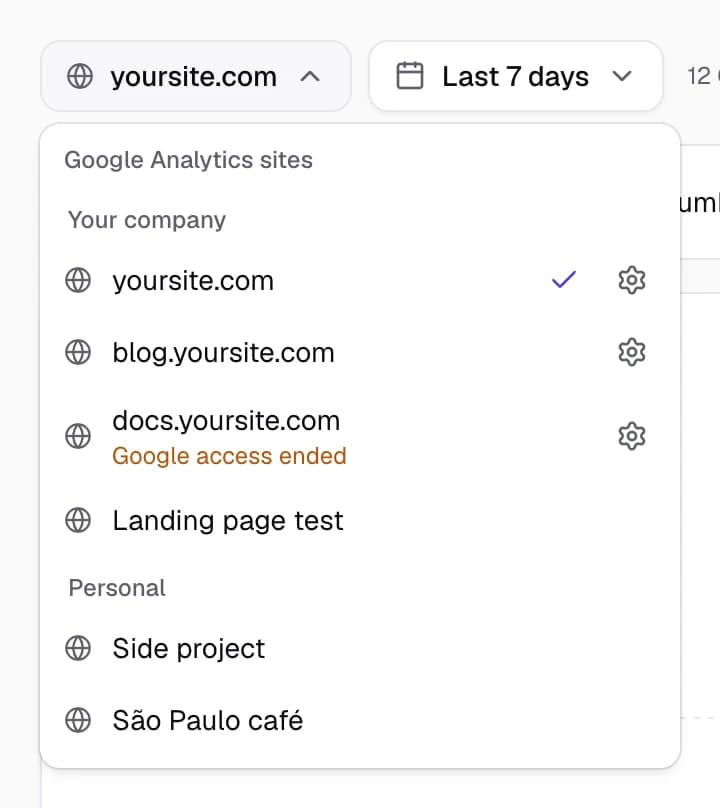
The menu shows:
- Every GA4 site your Google account can read, grouped by Analytics account when there are several.
- A search box, once you have 8 or more sites.
- A ✓ next to the site you're looking at.
- A gear next to each of your sites, which opens that site's settings.
- "Google access ended" under a site when Google no longer lets SimpleDash read it. See Troubleshooting.
Open another site
Click its name. If it isn't one of your sites yet, SimpleDash checks that your Google account can read it, adds it to your sites and opens its dashboard. There's no dialog to confirm and nothing to install.
The site you opened last is the one the dashboard opens with next time.
What each site keeps
Each site has its own:
- signup action (Signups)
- chart notes
- public stats page
- Search Console link and Stripe key (Pro)
- block in the Monday email (Pro)
Remove a site
Open the site's settings (the gear in the site menu), then choose Remove this site at the bottom. Its dashboard, Monday email block and public page stop.
Its notes and settings are kept: open it again from the site menu and they come back. Your last site can't be removed, so open another one first.
Don't see a site?
The menu lists what your Google account can read in Google Analytics. If a site is missing:
- Make sure you signed in with the right Google account.
- Ask the property's owner to add your account in GA4 (Admin → Property access management). The Viewer role is enough.
- Only GA4 properties show. Old Universal Analytics properties stopped collecting data in 2023.
Last updated
Free and Pro plans
What SimpleDash Free and Pro include, what they cost and how billing works. Free covers all your sites with no card; Pro adds history, email and more.
The dashboard
What every number, chart and list on the SimpleDash dashboard means, which Google Analytics 4 metric is behind it, and where to find it in GA4.