Share your stats with a public page
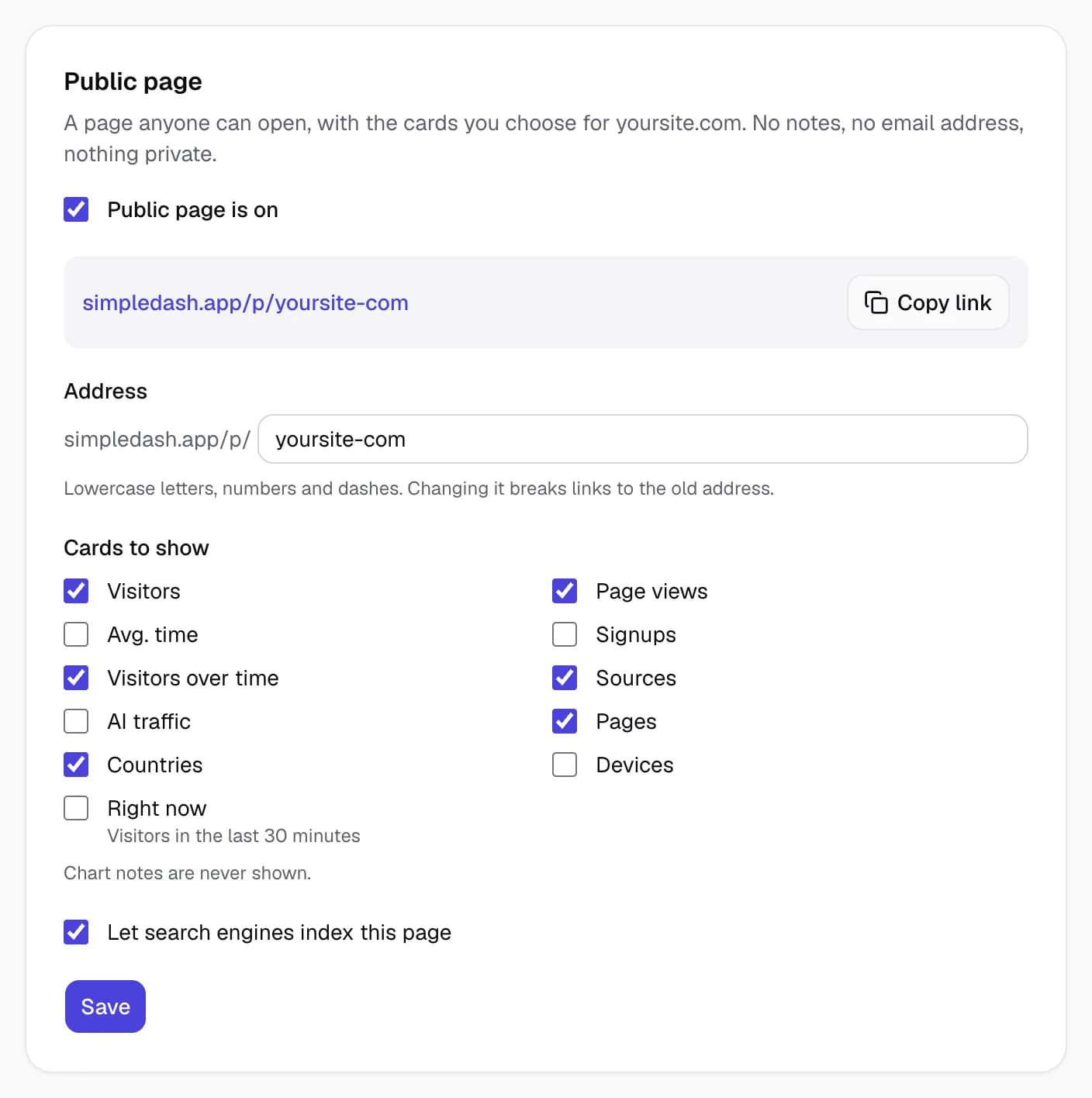
Turn on a public stats page for any site and choose the cards it shows. Anyone can open it; notes, your email and anything private never appear on it.
A public stats page is a page anyone can open, showing the cards you choose for one site: visitors, the chart, top pages and so on. It's made for building in public. Notes, your email address and anything private never appear on it.
It's on every plan. Here's a live example.
Turn it on
Either:
- On the dashboard, choose Turn on in the "Share your stats publicly?" card (it shows until you've set up a page once), or
- Open the site's settings (the gear in the site menu) and turn on Public page is on.
The page gets an address made from your domain: mysite.com becomes simpledash.app/p/mysite-com. It never changes, so links you share keep working. Use Copy link to share it.
Choose what it shows
Pick the cards in the site's settings:
- Shown by default: Visitors, Page views, the visitors chart, Sources, Pages and Countries.
- You can add: Avg. time, Signups, AI traffic, Devices and Right now (the live count, which opens the live globe).
- Never shown: Actions, chart notes, revenue, Google search data, your email address, your name and your Google Analytics property ID.
Visitors can switch date ranges, just like on your dashboard: Today, Yesterday, the last 7 and 30 days, custom dates and, for Pro owners, the last 12 months and any older dates.
Search engines
Let search engines index this page is on by default, so the page can show up in Google. Turn it off to keep the page shareable by link but out of search results.
Free and Pro
- Free: the page shows the last 30 days at most, like your dashboard, and a small "Powered by SimpleDash" link at the bottom.
- Pro: every range including 12 months, and no link.
How fresh it is
The page is cached for about 10 minutes, so it loads fast for everyone and doesn't use your Google quota. Right now, if you add it, shows the live count as the last number of the overview, updated every 20 seconds while the page is open; a click opens the live globe.
When it says "This page is paused"
Google no longer lets SimpleDash read the site, usually because the owner's Google access ended. Sign in to SimpleDash again (or reconnect Google) and the page comes back. A removed site's page shows "Page not found" until you open the site again.
Related
Last updated
Numbers vs GA4
SimpleDash and GA4 read the same data, so numbers should match. When they don't, here's why, and exactly where to compare each number in Google Analytics 4.
The Monday email
Every Monday afternoon, Pro sends last week's numbers for each of your sites: visitors, signups, top sources and pages, and what changed, in plain words.