Google search insights
With Pro, connect Search Console for one page to work on each week, the pages that bring signups with their searches, and searches close to page 1.
With Pro, SimpleDash adds a Google search card from your own Search Console data: one page to work on this week, the pages that bring signups and the searches behind them, the searches you're almost on page 1 for, what changed, and which pages are seen but not clicked. Connecting asks Google for one more read-only permission, only when you choose to.
Connect Search Console
Your site needs to be in Google Search Console first. If it isn't, add and verify it.
In SimpleDash, open the site's settings (the gear in the site menu) and choose Connect Search Console in the Google Search Console section. You can also start from the dashboard's "Connect Search Console" card.
Google asks you to allow https://www.googleapis.com/auth/webmasters.readonly: read-only access to Search Console.
SimpleDash picks the matching property: your site's domain property first, then a URL-prefix property, then a parent domain property. You can choose another one in the site's settings.
The card
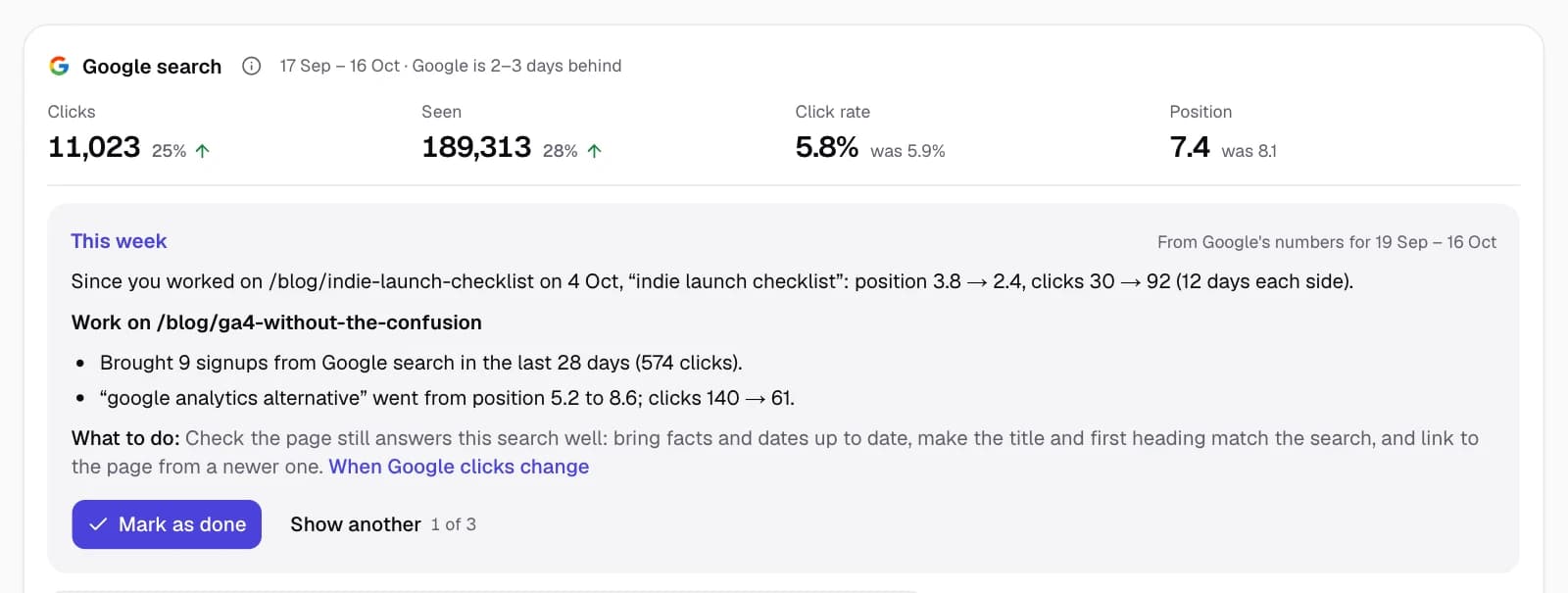
The top shows Clicks (visits from Google search), Seen (impressions: how often your pages appeared in results), Click rate and average Position, compared with the period before. Then This week, and five views.
This week
One page to work on, picked every Monday from the last 28 days of Google's numbers, so it doesn't change when you switch dates. Pages that bring signups come first:
- Slipping: its most-seen search lost 2 or more positions.
- Close to page 1: a search at positions 8 to 15, seen at least 100 times.
- Seen, not clicked: Google shows it often, but people rarely click.
You see the numbers behind the pick, short steps and a guide. Show another shows the next two. Mark as done adds a note to your chart ("Worked on /blog/ga4-setup"), and in later weeks the card shows how that page and search moved since: position and clicks, the same number of days before and after. Pages you worked on are left alone for 28 days.
Brings signups
The first tab when you've chosen a signup action: your pages with the signups from Google search visitors who landed on them (from GA4) and their Google clicks, with the searches that showed each page most. A Slipping tag marks a page whose main search lost 2 or more positions. Google doesn't say which search led to a signup, so the card never splits signups between searches.
Close to page 1
Searches where your pages rank around positions 8 to 15, most seen first, grouped by page. A small improvement here can move a search onto page 1. How to use this list.
What changed
The pages whose Google clicks rose or fell the most against the period before, with the searches behind each change: clicks and position then and now. Facts only, never a reason. Find what changed.
Your name vs new people
Clicks from searches that contain your site's name, against all other searches, over time. The name comes from your domain, and you can add spellings in the site's settings. The two don't add up to all your Google clicks, because Google leaves out searches made by very few people. Branded vs non-branded traffic.
Seen, not clicked
Pages that appear often but get clicked less than your own pages at about the same position. Compared only with your own site, never with an industry number. Pages seen but not clicked.
Good to know
- Google is 2 to 3 days behind. Search Console's newest data is usually two or three days old, so the card shows its own dates and moves the period back to match.
- 16 months. Search Console keeps 16 months of data, so older periods can't be compared.
- Disconnect in the site's settings. It stops the card for that site only; to end the permission for every site, remove SimpleDash from your Google account.
Related
Last updated
The Monday email
Every Monday afternoon, Pro sends last week's numbers for each of your sites: visitors, signups, top sources and pages, and what changed, in plain words.
What brings customers
With Pro, see where the people behind your signups and sales first found you, next to the visit they signed up or bought on, and how long it took.